Professr Solv – Formal Product Document
1. Executive Summary
Product Name: Professr Solv
Tagline: Your intelligent assistant!
Overview: Professr Solv is a Microsoft Teams-integrated bot designed to automate support ticket management for Intelegain Technologies customers. It simplifies the process of raising and tracking support tickets, ensuring faster resolution and improved customer satisfaction.
2. Purpose & Use Case
- Problem Solved: Manual support ticket creation and tracking can be time-consuming and error-prone. Professr Solv automates this process, reducing friction for customers.
- Target Audience: Customers of Intelegain Technologies who require efficient support ticket management.
- Business Value: By streamlining ticket workflows, Professr Solv enhances customer experience, reduces response times, and improves operational efficiency.
3. Features & Capabilities
- Raise Support Tickets: Customers can quickly create support tickets directly within Microsoft Teams.
- Ticket Status Enquiry: Users can check the progress of their tickets without leaving Teams.
- Support Ticket Management: Facilitates seamless communication between customers and support teams.
- Differentiator: Unlike generic bots, Professr Solv is purpose-built for support ticket automation, tightly integrated with Intelegain’s support ecosystem.
4. Technical Architecture
- Platform: Built on Python.
- Integration: Native integration with Microsoft Teams.
- Authentication & Security: Uses Microsoft Entra for secure authentication, role-based access control (RBAC), and data protection.
- Scalability: Designed to handle multiple concurrent ticket requests with enterprise-grade reliability.
5. Compliance & Policies
Privacy Policy: Available at Intelegain Privacy Policy.
- Terms of Service: Maintained and aligned with Intelegain’s compliance standards.
- Data Security: Adheres to Microsoft’s security framework, ensuring encrypted communication and secure ticket handling.
- RBAC: Ensures only authorized users can raise or view tickets, protecting sensitive customer data.
6. Support & Contact Information
- Support Contact: Support is provided via Intelegain’s customer service channels.
- Escalation Process: Customers can escalate tickets through Teams, which routes them to the appropriate support team.
- Documentation: User onboarding and FAQs are provided within Teams.
7. Branding & Marketplace Assets
- Logo:

- Marketing Copy:
o Professr Solv – your intelligent assistant for effortless support ticket management.
o Integrated with Microsoft Teams, Professr Solv ensures customers can raise and track tickets seamlessly, improving satisfaction and efficiency.
- Screenshots:
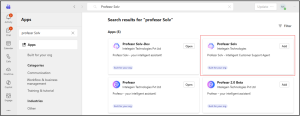
8. Marketplace Positioning
Professr Solv is positioned as a customer support automation bot within the Microsoft Marketplace. Its integration with Teams makes it a natural fit for organizations already leveraging Microsoft’s collaboration ecosystem. By focusing on ticket automation, Professr Solv differentiates itself from general productivity bots, offering a specialized solution for Intelegain Technologies customers.
9. Testing Process
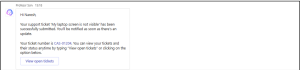
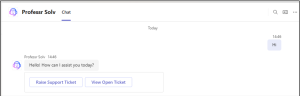
1. Once user starts conversation with bot, it will greet user and provide prompt to go ahead with raising ticket.
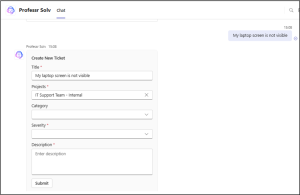
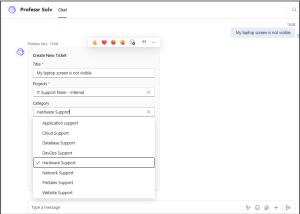
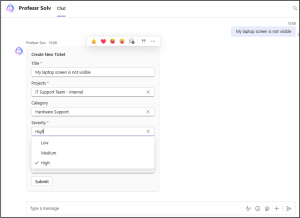
3. User will be filling all the required field and submit the ticket, and system will